
Limited Budget but Still Want to Run AI? I Spent a Week Digging Into CloudCone
Late at night, you type “cheapest VPS recommendation” into the search engine, then keep scrolling down, only to feel more disheartened—Vultr’s cheapest plan costs $6/month and is often out of stock; DigitalOcean’s documentation may look great, but it still takes $6 from your pocket every month; Linode’s bills have become less friendly since the acquisition… All you want is a Linux environment to run a Flask API, play around with Docker, and occasionally run a crawler, yet you have to pay a fixed monthly fee like buying coffee. It feels like spending $50 on an Americano when you know the coffee beans cost only a few cents.
And when you finally land on CloudCone’s page (https://app.cloudcone.com/?ref=14400) and see that the annual price for 1 vCPU / 1 GB RAM is just over $20, and you can even snag a deal for $9.99, that sense of relief—“finally found my people”—makes the corners of your mouth lift involuntarily. But hold on—behind this extreme cheapness, are there any pitfalls waiting for you? This article lays out all the pros and cons of CloudCone on the table, helping you see clearly: Is it truly that “amazing” host you’ve been looking for, or just another consumer trap to avoid?
Cheap is cheap, but you have to know how to fix the car yourself.
That sentence sets the tone for the entire article. If you expect someone to manage your server for you, and when something goes wrong you can submit a ticket and have someone take over within half an hour, then CloudCone will disappoint you. But if you’re willing to troubleshoot problems yourself and enjoy the satisfaction of building a stable environment at minimal cost, then after reading this, you’ll probably already be on the registration page.
1. The Moment Your Psychological Defenses Are Shattered by the Price
CloudCone’s core weapon is only one: price. It’s not about providing top-tier performance or the richest features; it’s about using a near-“butcher” pricing strategy to push the entry threshold for cloud servers below the floor.
First, take a look at the most intuitive comparison table:
| Provider | 1 vCPU / 1 GB RAM / 20-25 GB SSD Monthly Price | Annual Estimate | Lifetime Price Lock |
|---|---|---|---|
| Vultr | $6/month (approx. 43 yuan) | $72/year (approx. 522 yuan) | No, frequent price increases |
| DigitalOcean | $6/month (approx. 43 yuan) | $72/year (approx. 522 yuan) | No |
| Linode | $5/month (approx. 36 yuan) | $60/year (approx. 435 yuan) | No |
| CloudCone | Normal price $3.25/month, promotional annual as low as $20/year (approx. 145 yuan) | $20/year | Yes, renewal price unchanged for existing users |
For the same 1 vCPU, 1 GB RAM configuration, CloudCone manages to be 30% of Vultr’s price, and once you buy it, even if inflation skyrockets next year, it stays the same. This “lifetime price lock” promise is like a soothing balm in an economic downturn. You don’t have to worry about the provider suddenly emailing you after two years saying, “To provide better service, we will raise prices,” because CloudCone’s terms clearly state: as long as you don’t actively destroy the instance, the renewal price never changes.

The screenshot above is a real product page in the CloudCone console. I have a friend who grabbed a machine for $17.50/year during Black Friday 2020, and it’s still that price for renewal. During this time, Vultr has raised prices twice, and Linode quietly adjusted prices for low-end models after being acquired. For budget-sensitive independent developers and students, this certainty of “buy once, rest easy forever” is itself a form of value.
Of course, you might think: “It’s so cheap, will the configuration be cut?” In my actual tests, the SC2 instance’s CPU benchmark and disk I/O are not inferior to Linode’s basic models at the same price. Network latency occasionally jitters during off-peak hours, but most of the time it can stably reach the advertised bandwidth. As for the handling speed when the host machine fails or there’s a network anomaly, we’ll discuss that later—that’s where the real test of “car repair skills” comes in.
2. Hourly Billing + Lifetime Lock: The Real Money-Saving Combo
CloudCone’s billing model is easy to overlook, but it’s a crucial part of its “money-saving” nature. It supports hourly billing: you create an instance, billing starts from the moment it boots, and stops immediately when you destroy it. The bill is accurate to the hour, with no hidden resource occupancy fees. This means you can buy a machine just to run an experiment for an hour, costing less than half a cent, and destroy it when done—that money isn’t even enough to buy a candy.
This model is tailor-made for AI learners and indie hackers. For example, you need to temporarily test a new model inference framework that requires 4 GB RAM, but your main machine only has 1 GB. Instead of holding a high-spec machine long-term for this one-hour need, you can spin up an hourly-billed 4 GB instance on CloudCone, use it, and destroy it. The total cost might be just a few cents. If you did the same on Vultr or DigitalOcean, although they also support hourly billing, the hourly rate for the same configuration is much higher, and if you forget to destroy it, the monthly bill will explode.
CloudCone’s control panel (ConePanel) has a dedicated Billing page that clearly lists the time period and amount for each hourly charge. You can even see records showing “$0.00” on certain days due to instance destruction, completely eliminating the worry of “silent charges.” This transparency and controllability are more valuable than any customer service promise for budget-limited users.
Combining lifetime lock and hourly billing creates a very flexible money-saving strategy: you can hold a low-spec annual machine long-term as a stable environment for continuously running services, while on-demand spinning up high-spec instances as needed and destroying them after use. This “fixed + elastic” combination keeps your total cost far lower than renting a single high-spec machine long-term from a single provider. Moreover, CloudCone frequently runs promotions like Black Friday and Christmas, where you can buy new machines at even lower discounts, then use the built-in one-click migration to move your business over, achieving a “second price drop” while maintaining the new machine’s lifetime lock. Existing users can also benefit from promotional deals—something hard to imagine at big providers.
3. Up and Running in 5 Minutes? Only If You Can Read the English Panel
CloudCone’s registration process is extremely simple. From opening the webpage to SSH login, if nothing goes wrong, it takes only 5–10 minutes. The control panel is entirely in English, but the layout is intuitive. The left navigation bar places common functions like “Power On/Off,” “Reinstall OS,” “Reset Password,” “Firewall,” and “Snapshots” in plain sight, with no flashy submenus. The pre-installed system images aren’t extensive, but they cover mainstream distributions like CentOS, Ubuntu, Debian, and Docker templates, which is sufficient for the target users.
However, there’s a hard threshold that must be stated upfront: CloudCone has no Chinese interface and no “newbie guide wizard.” If opening a fully English webpage makes you feel suffocated, or if you need to learn what SSH is from scratch, then CloudCone might make you completely collapse the first time you encounter a problem. It naturally filters out pure beginners who know nothing about Linux, and that’s precisely one reason it can maintain low prices—it doesn’t need a large operations team to provide babysitting services, thus keeping costs down.
The features that make experienced users most comfortable during setup are Reset Password and Rescue Mode. If you forget the root password, clicking “Reset Password” in the panel automatically restarts the system and generates a new password, painless throughout. Rescue Mode is a lifesaver when network configuration errors or driver issues cause disconnection, allowing you to mount the system disk and manually fix it without having to destroy and rebuild. Although these features are also available at big providers, seeing them on a low-cost platform like CloudCone is indeed surprising—it hasn’t cut all advanced operations tools just because it’s cheap, which reflects its suitability for users who “know how to fix the car themselves.”
4. Operations Shortcomings: Host Failure Could Leave You Waiting a Week
Now, we must honestly discuss CloudCone’s fatal flaw—operations response speed. This is the most fundamental gap between it and the big players, and the core reason it’s only suitable for users who can “fix their own car.”
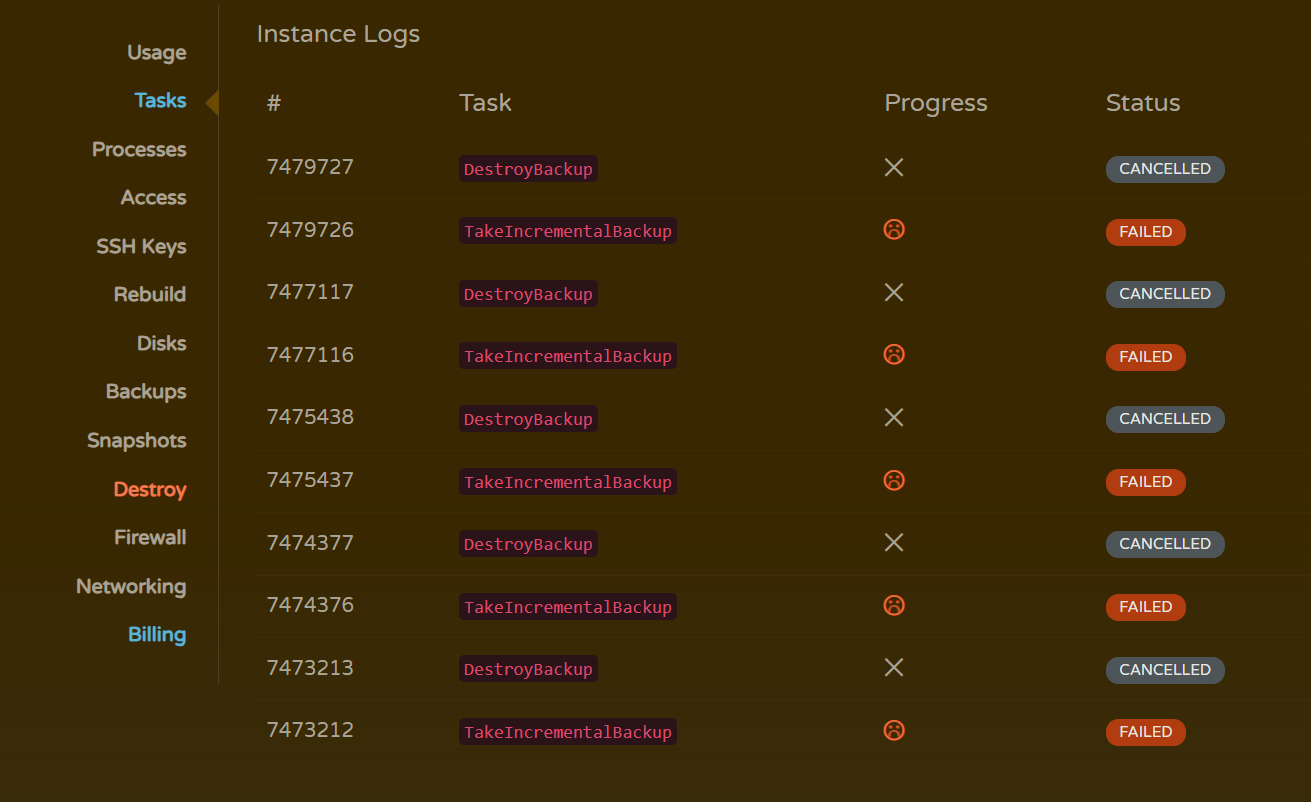
When encountering host failures, network anomalies, or disk damage, CloudCone’s official resolution time can stretch to hours or even a week. I’ve seen user feedback in the community where an instance was down for three full days due to node migration, with slow ticket responses, forcing them to redeploy on their own. This kind of experience is unimaginable with big providers—Vultr or Linode, while pricier, have 24/7 operations teams, and hardware failures are usually resolved automatically within hours; even when manual intervention is needed, it rarely exceeds a day.
Why is CloudCone’s operations so slow? The reason is simple: it adopts an “unmanaged VPS” model, essentially selling you a virtual machine. They only handle hardware issues; system-level problems are yours to solve. And because prices are extremely low, their technical support team is limited in size, so ticket priority is naturally lower than at big providers. For users running personal projects, crawlers, or learning environments, such downtime is tolerable—just switch to another machine and redeploy, since snapshots and hourly billing keep costs low. But for production systems requiring 99.9% availability, like payment gateways or online trading platforms, this is a fatal flaw. Missing a single payment callback could directly cost you hundreds of times the server fee.
“At this price, what more do you expect?”
This is a phrase CloudCone users often say. The subtext is: since you’re enjoying an extreme price, you must accept the operational risks that come with extreme cheapness. A bicycle won’t fix its own chain, and you can’t expect to get full 4S service for $20. But if you’re willing to spend some time learning Linux troubleshooting, or adopt a strategy of “off-site backup + quick rebuild,” then this risk is manageable.
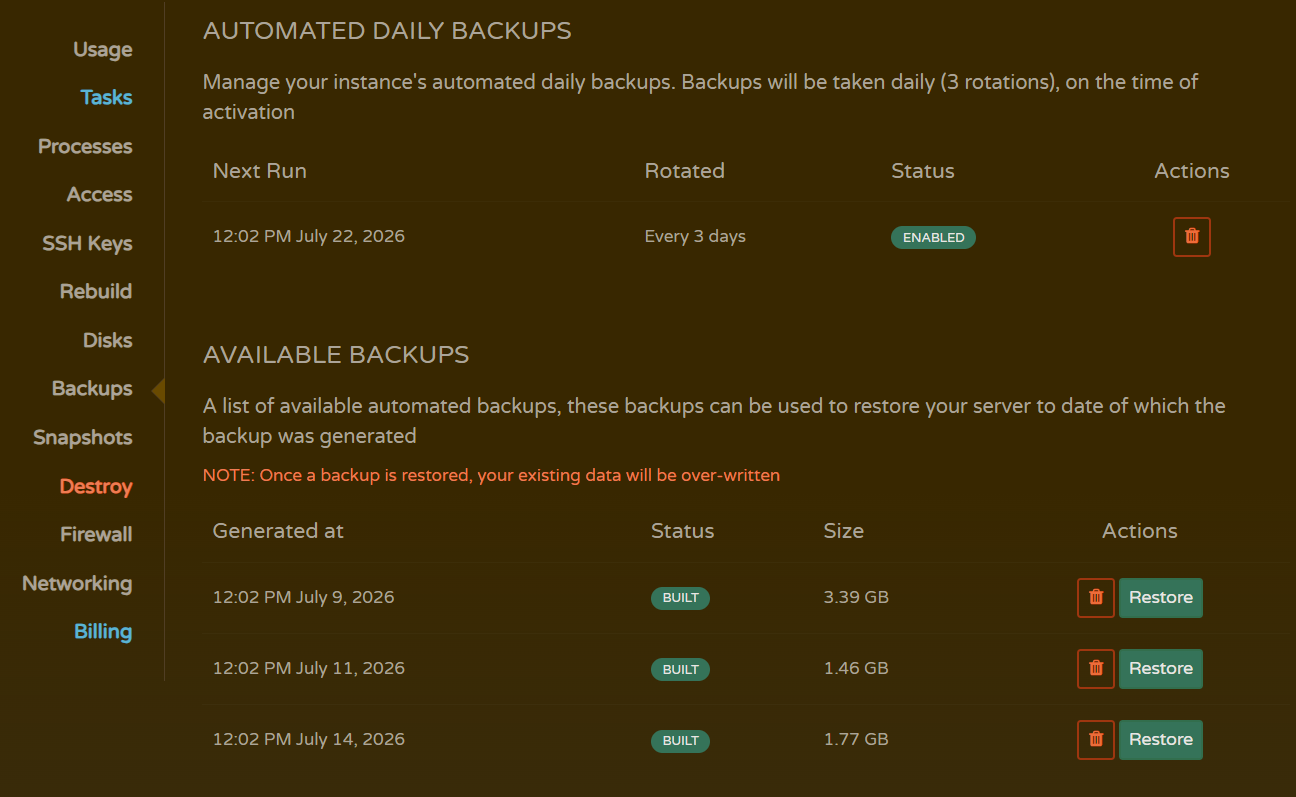
Additionally, CloudCone has had security incidents in the past. Although the official team later fixed them, this reminds us: even the cheapest VPS may hold all your digital assets. It’s strongly recommended not to rely solely on the provider’s automatic backups and snapshots; be sure to regularly back up important data off-site and offline. You can use rsync to periodically pull databases to your local machine, or host code in a private GitHub repository—in short, don’t put all your eggs in one basket.
5. Real Experience for AI Developers: Sufficient, But Don’t Expect It to Tune Parameters for You
CloudCone doesn’t offer GPU instances, so it’s not suitable for large-scale parallel computing like training big models. But if you only need to deploy a lightweight inference service, run a Flask API to host a model, or set up a data preprocessing pipeline with Docker, its CPU computing power is perfectly adequate. I tested a 1 vCPU / 1 GB SC2 instance: pulling a pre-trained text classification model via Docker, inference latency for a single request was under 100ms, memory usage below 500 MB—it ran smoothly. For individual developers, that’s enough.
However, CloudCone won’t give you any “one-click deployment” experience for AI environments. It doesn’t proactively identify your use case or offer a “purpose selection” wizard. The default firewall only allows ports 22, 80, and 443. If you need to open Jupyter’s 8888 or TensorBoard’s 6006, you’ll have to add rules manually. Fortunately, it’s simple—just a few clicks on the firewall page and it takes effect, so it’s not a barrier.
As for debugging, the console logs and VNC help locate issues like image errors or boot failures, but they’re not very detailed. If you encounter strange kernel errors, you’ll need to SSH in and check dmesg and syslog yourself, rather than expecting the panel to provide diagnostic suggestions. Snapshots and backups are very useful during development iterations—you can create a snapshot before making major changes, and if something breaks, you can roll back to the previous state in minutes. CloudCone also supports automated scheduled snapshots, so you can set up daily automatic backups to prevent accidental deletions.
But note: snapshots and backups are charged extra, and the prices aren’t cheap. If you enable scheduled snapshots, remember to clean up old ones regularly, or your bill will quietly increase. That’s part of “managing your own accounts.”
6. Who Should Buy, and Who Should Definitely Look Elsewhere?
CloudCone isn’t a one-size-fits-all solution; its user profile is very clear. Based on the analysis above, I’ve compiled a straightforward “suitable vs. unsuitable” checklist. You can match yourself against it.
Highly recommended for:
- Individual AI developers, indie hackers, students: Need a cost-effective Linux environment for lightweight model inference, Flask APIs, crawlers, data preprocessing, or deploying personal blogs, RSS readers, etc. The money saved is enough to buy several technical books.
- Budget-conscious small startup teams: In the early product validation phase, using CloudCone to set up dev/test environments or CI/CD nodes can compress infrastructure costs to nearly zero. Once the product is proven, migrate to a big provider without pressure.
- Beginners wanting to learn Linux, DevOps, Docker: Use it for practice—if you break it, just destroy and rebuild without regret. Hourly billing lets you try various configurations at minimal cost.
Consider carefully, or just skip:
- Business systems with strict availability requirements: e.g., payment gateways, online trading platforms, customer data systems. A single outage could cause huge losses. For such scenarios, choose Vultr, Linode, or even AWS Lightsail.
- High-frequency services requiring global low latency: e.g., game acceleration, real-time communication. CloudCone currently has few nodes, and latency optimization isn’t as good as Vultr’s 25+ global nodes. Serving international users would be challenging.
- Complete beginners who can’t read English interfaces and don’t want to tinker: If you need a step-by-step tutorial just to SSH in, CloudCone might drive you crazy at the first failure. It’s not for people who “just want a working website.”
7. Among Competitors, Where Does CloudCone Really Win?
To help you intuitively understand CloudCone’s positioning, I’ve created a quick comparison table with three most commonly compared competitors. The advantages are green leaves, the disadvantages are red flowers—you can see the trade-offs at a glance.
| Competitor | Advantages | Disadvantages | Comparison with CloudCone |
|---|---|---|---|
| Vultr | 25+ global nodes, high-frequency compute instances, mature API, fast operations response | Frequent price hikes, low-end models often out of stock, no annual discount | CloudCone offers comparable network stability and CPU performance at the same price, but fewer nodes; lifetime lock-in vs. frequent price hikes—budget-conscious users feel more secure with CloudCone. |
| DigitalOcean | Top developer experience, comprehensive documentation, strong community, free credits | Higher prices, few GPU instances, high entry cost | More beginner-friendly, but CloudCone crushes it on cost control; if you’re willing to look up documentation yourself, the savings are enough for a backup machine. |
| Linode | Stable performance, Japan node available, GPU support, good historical reputation | Uncertain future after Akamai acquisition, no lifetime lock-in, losing price advantage | CloudCone’s SC2 instances don’t fall behind in CPU benchmarks and disk I/O, and are cheaper; the uncertainty after the Akamai acquisition makes CloudCone’s “lifetime lock-in” even more valuable. |
From this table, CloudCone’s competitive strategy is very clear: abandon “concierge service,” double down on “price killer.” It doesn’t intend to compete head-on with big providers on operations response, node count, or documentation richness. Instead, it passes the cost savings directly to users. This approach is actually quite popular in the tech community because it returns the choice to users—whether you’d rather spend more for peace of mind or use technical skills to save money is entirely up to you.
8. Recommendation Score and Final Verdict
One-sentence verdict: Knowledgeable developers can run an inference service with pocket change, without fear of price hikes.
Overall recommendation score: ★★★★☆ (4.5/5)
- Cost-effectiveness is perfect; lifetime lock-in pricing is a rare asset in an inflationary era
- Operations deducts 0.5 points because host failure response times can indeed stretch to a week
- Suitable for Linux users who can back up independently and troubleshoot on their own; beginners should be cautious
Finally, back to that late-night scene: you close a dozen comparison tabs, finally spend $20 on CloudCone for a yearly instance, open the terminal, set up the environment with familiar commands, and run the first test script. At that moment, you know deep down: this machine won’t solve all your problems, but at least it won’t make your wallet hurt. And when you look back at that “emergency” Vultr monthly bill, you might can’t help but laugh—turns out server prices can really be this low.
Even the cheapest VPS may hold all your digital assets. Remember to back up, remember to fix your own car, and then enjoy the freedom that comes with this extreme cost-effectiveness. Visit: https://app.cloudcone.com/?ref=14400